Identity and access management (IAM) overview#
Lambda Cloud's identity and access management (IAM) system lets you manage the users and services in your account and control which operations they're allowed to perform. This page describes the core concepts in Lambda Cloud's IAM system and how they relate to each other.
Core concepts#
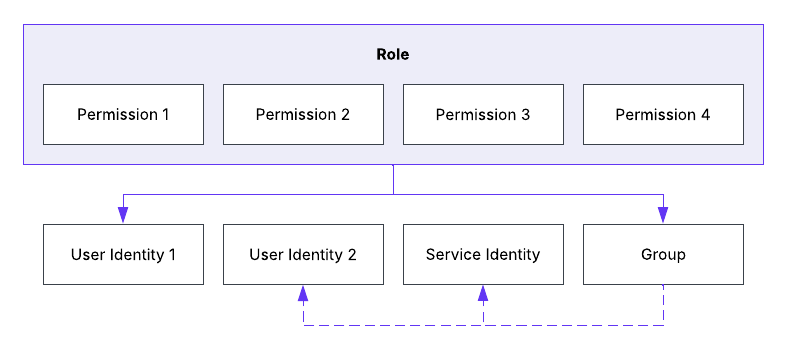
Lambda Cloud's IAM system uses role-based access control (RBAC). In this model, you grant permissions to an identity or group of identities by assigning a role that includes those permissions. The following diagram illustrates the relationship between identities, groups, permissions, and roles:
Identities and groups#
In Lambda Cloud's IAM system, an identity is a uniquely identifiable entity that, when assigned a role, can perform operations permitted by that role. Lambda Cloud categorizes identities into two types:
- User identity: An identity that represents a human user of the account.
- Service identity: An identity that represents a non-human user of the account. Used for automating Lambda Cloud operations.
In addition, you can add identities to a group. When an identity becomes a member of a group, it inherits any access that has been granted to that group, including role assignments and workspace memberships.
Permissions and roles#
Each entity in the Lambda Cloud resource hierarchy supports a set of operations that can be performed on it. Lambda Cloud's IAM system maps each operation to a permission that, when granted, allows an identity or group to perform the operation.
To grant a permission, you assign a role that includes that permission to the intended identity or group. A role bundles a related set of permissions into a single assignable entity.
You can assign multiple roles to a single identity or group. When you assign a role to a group, the identities in the group inherit all of the permissions included in the role.
Permission scopes#
Permissions can be either account-scoped or workspace-scoped:
- Account-scoped permissions map to account-level operations, such as adding identities to the account or updating billing information.
- Workspace-scoped permissions map to workspace-specific operations, such as launching an instance or deleting a firewall rule.
Role types#
The scope of a role's access depends on its role type. Each role can be either an account role or a workspace role.
- An account role can include both account-scoped permissions and workspace-scoped permissions. The account-scoped permissions apply to the whole account, and the workspace-scoped permissions apply to any workspace the assignee is a member of.
- A workspace role includes workspace-scoped permissions only, and applies exclusively to the workspace you specify when assigning the role.
Default roles#
Lambda Cloud's IAM system assigns the following roles by default:
- When you create a Lambda Cloud account, your identity receives the Account Admin role.
- When you add an identity or group to a workspace, the identity or group receives the Workspace Member role.
- When you accept an invite to an account, or when you join an account through SSO, you receive the Account Member role, and also the Workspace Member role in the account's default workspace.
For full details about each of these roles, including which permissions they grant, see Predefined roles.